iPhone 3.0 finally adds iCalendar subscriptions
As announced last month at the preview event, Apple has finally added support for subscribing to iCal (.ics) calendars to the iPhone OS. This is a feature I’ve been missing from the first day I started using the iPhone: up until now the only way to synchronize a calendar was using a desktop app and syncing with that.
The new feature allows you to access any .ics file you’d like over either http or https, synchronizing it automatically over-the-air (both wifi and 3G) without requiring extra software such as NuevaSync. This is how to configure it if you have access to a beta of the 3.0 firmware:
The settings are hidden under the Settings-menu, in the Mail section:
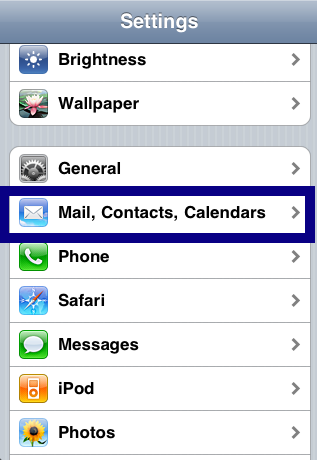
In the current version, you can add calendar subscriptions in the same menu as mail accounts:
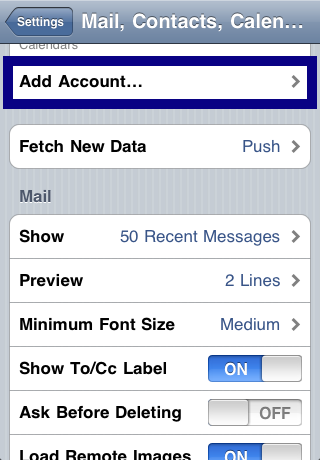
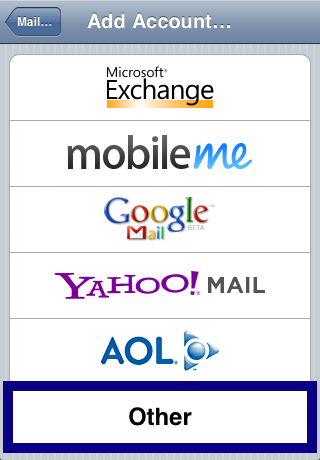
At this moment you need to use the “Other” option; I’m sure this will get moved to a more obvious location in the final release, but the functionality is there:
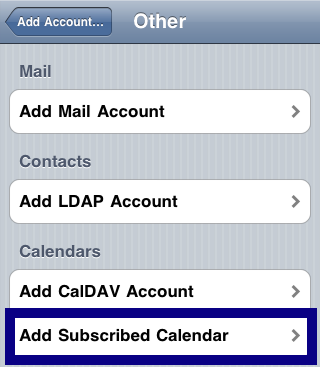
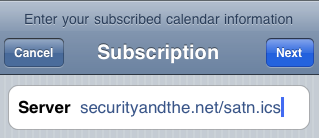
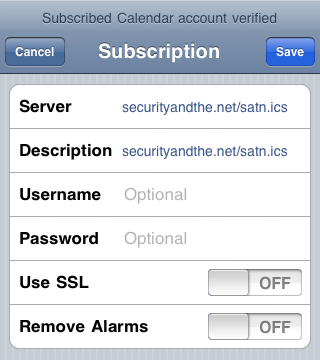
You can give the URL to an ics file in the next screen; after checking whether or not it’s accessible you can optionally force SSL and add a username and password if necessary.
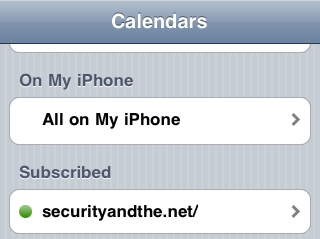
The subscribed calendar now shows up next to your other calendars. It updates automatically based on the schedule you have set for updating mail. When set to “Manually” it updates as soon as you access the calendar.




April 23rd, 2009 at 11:45 pm
[…] Security and the Net added an interesting post today on iPhone 3.0 finally adds iCalendar subscriptionsHere’s a small readingApr.23, 2009 in Apple, Howto’sAs announced last month at the preview event, Apple has finally added support for subscribing to iCal (.ics) calendars to the iPhone OS. This is a feature I’ve been missing from the first day I started using the iPhone: up until now the only way to synchronize a calendar was using a desktop app and syncing with that.The new feature allows you to access any .ics file you’d like over either http or https, synchronizing it automatically over-the-air (both wifi and 3G […]
May 7th, 2009 at 8:06 pm
What’s really cool is, you can email the URL to yourself (or someone else), then just click on the URL in iphone Mail, and the phone will recognize it as an ical subscription feed and ask if you want to subscribe! If you say “yes”, it will alert you when it’s succeeded. Awesomeness.
May 19th, 2009 at 1:04 pm
It was interesting. You seem very knowledgeable in your field.
September 21st, 2009 at 5:37 pm
This is broken. “Subscribed Calendar account verification failed” Guess what? The ICS file doesn’t need any verification. Just download the goddamn file you fucking piece of shit iphone. What’s so hard to understand? Mime-type is text/calendar. I can download the .ics file with fucking curl for fucks sake. There is no “account verification” you fuckwit piece of shit phone!